How to use Claude for sales prospecting
· The Saleshunt Team
Claude is good at the thinking around prospecting: working out who your best customers are, reading up on one company, drafting the first email. Building the list itself, every company in your market checked against your question, is a different job. Connect Saleshunt to Claude and you can do both in the same chat, in your own words.
What to use Claude for on its own
Three jobs where Claude helps straight away, with a prompt you can copy for each.
Work out who your best customers really are
Paste in a few of your best customers and why they bought. Ask what they have in common that you couldn't filter for by industry or size. It often surfaces the one fact that decides whether a company is a fit.
Here are five of our best customers and why they bought from us. What do they have in common that an industry filter wouldn't show? Turn it into one sentence I could use to find more companies like them.
Read up on one company before a call
With web search on, Claude reads a company's website and recent news and gives you the short version, with links.
Before my call with this company, read their website and recent news. What do they make, who runs it, and is there any sign they're working on their sustainability reporting? Link every source.
A first draft of an email
Give it what you know about the company and the person, and ask for something short you can react to.
Draft a first email to the head of sustainability at this company. Mention the sustainability report they published this year, keep it under 100 words, and end with one simple question.
All three are about one company, or one idea, at a time. That's where Claude is at its best.
Where Claude stops: the list itself
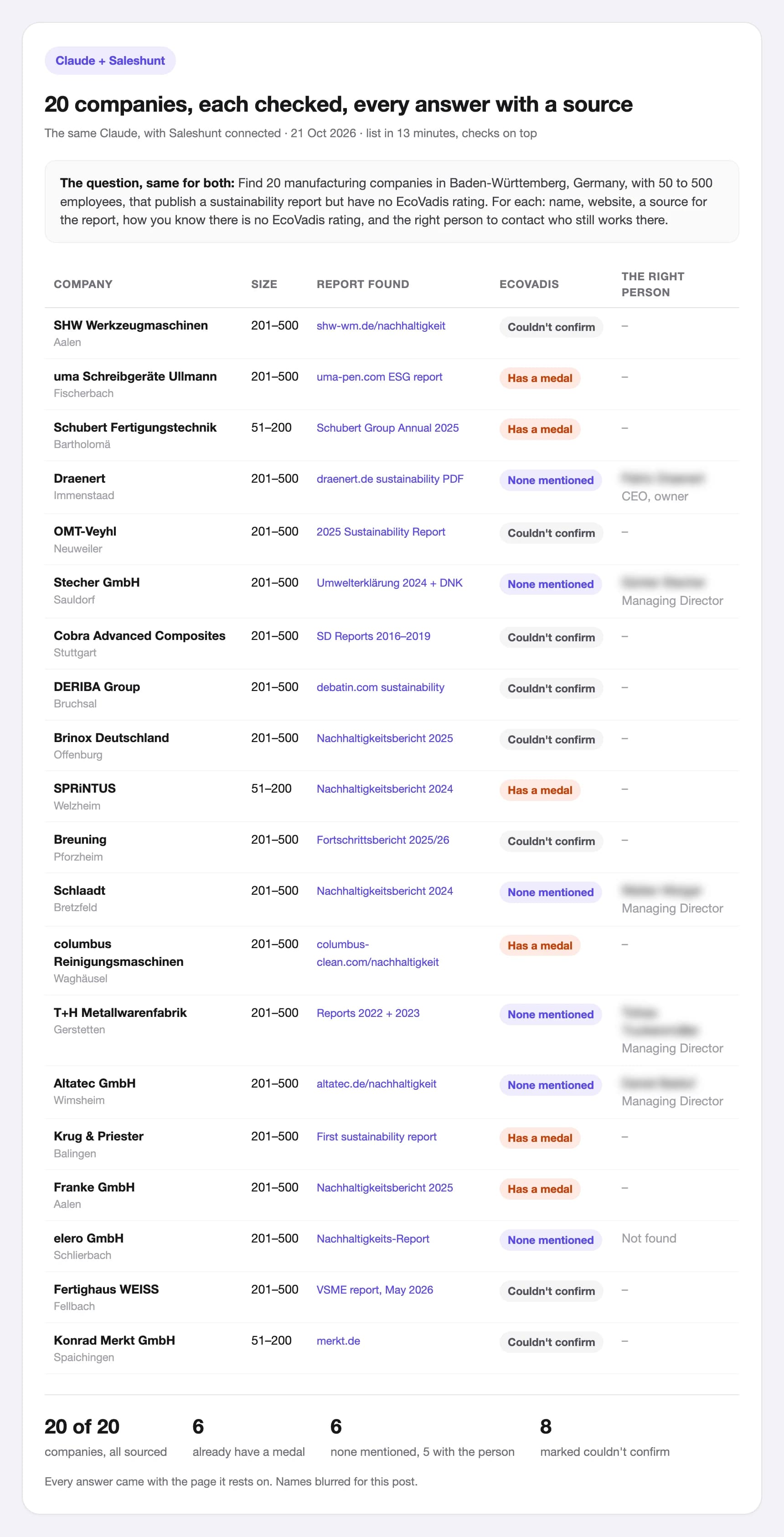
Ask Claude for twenty companies that fit a specific question and it will do its honest best with web search. When we tried it, Claude came back with four companies and a clear note that it couldn't check twenty in one session. With Saleshunt connected, the same Claude delivered all twenty in 13 minutes, each checked against the question, every answer with a source. We wrote up the whole test in Can ChatGPT or Claude build your prospect list?
Connect Saleshunt to Claude in five steps
- In Claude, open Customize, then Connectors.
- Choose Add custom connector.
- Name it Saleshunt and paste the server URL: https://api.saleshunt.ai/mcp
- Sign in with your Saleshunt account, or create one during sign-in. You start with 25 companies free, no card.
- Start a new chat and make sure Saleshunt is switched on for it. Then ask for your market in your own words.
Custom connectors work on every Claude plan, Free included. The Free plan allows one. On Team and Enterprise, an owner adds it for the whole organisation.
What Claude can do with Saleshunt connected
Claude picks the right step for what you ask. Each step runs on your Saleshunt balance, and you start with 25 companies free.
| Step | What it does |
|---|---|
| Find companies | Checks the companies in your market against your question and brings back the matches |
| Look into a company | Answers any question about one company, with the source |
| Find the right person | Finds the right person to contact at a company |
| Find a work email | Finds that person's work email |
| Results and searches | Reads back earlier results and lists your searches |
Prompts that work
Describe your market the way you'd explain it to a colleague. Three examples, built on questions our customers asked:
Find manufacturers in Baden-Württemberg with 50 to 500 staff that publish a sustainability report but have no EcoVadis rating.
Find food producers in Germany that make burgers or sausages from beef.
Find companies with 1,000+ staff that run a CSR or volunteering programme.
Then keep going in the same chat:
For these companies, find the person responsible for sustainability and their work email.
Three things make the list better:
- Say what decides a fit. “Publishes a sustainability report” is something Saleshunt can check for every company. “Sustainable companies” isn't.
- Read the sources. Every answer links to where it was found. Where nothing could be found, it says “couldn't confirm”. Check those before you reach out.
- Start small. Ask for twenty, look at them, sharpen the question, then ask for more.